Download Prisma for Android:- Best Photo Editor for Modern Art Filter

Prisma is now officially available for everyone for download and it’s now tagged as one of the best photo editor for android and iOS devices. However, when it comes to editing your photo into a modern artwork, then prisma is the best application for the task.


This application features 30 different filters that can modify any image into an artwork, stunning photo effects and within the short period of the app launch, the engagement on the app is massive as they now have millions of daily users making use of the app to edit photos.

Prisma application also comes with fast sharing features, which lets user share there already modified image to friends round social networks. So, having downloaded prisma application, you get to transform your photos into artwork.

According to the developers of the app, future update would feature video editing and some other cool stuff would be integrated. For now, I advise you download the app and enjoy the editing features of Prisma application.


Download Prisma for Android on Playstore


Prisma is now officially available for everyone for download and it’s now tagged as one of the best photo editor for android and iOS devices...

[AWARENESS][PROTECTION] Factory Reset Protection

Factory Reset Protection


What is factory reset protection (FRP) on Google Android devices and what does it do?  FRP works like this, if your device is lost, stolen, or wiped, only someone with your Google account or screen lock information can use the device. In concept this is a great idea and should keep criminals from using your phone after they steal it and maybe even keep them from stealing your device in the first place.

Here Are Some Of The Problem With This New Built In Feature In Android 5.1 Lollipop And Above.

You forget your own password and or Google account info.
You buy a used phone on line and the owner doesnt wipe the device correctly and you cant use it because of FRP.

Your kid plays with your phone and messes it up causing it to get stuck on this FRP screen. maybe you are older and the person at the carrier store
where you got your phone set it up for you and never even gave you your google account info. NOTE I have seen this happen.

There can be many good legal reasons that you may need to bypass FRP on your device so that you can use it again. unless someone shows you how to bypass FRP you dont have many options to get your device working again unless you can get a oem to repair it for you which isnt likely unless the device is new. FRP should be a feature that is turned on my a owner and only with many many warnings that must be read before the device owner can turn it on to protect them from any of these problems. Google please correct this and make FRP optional.

NOTE FRP is turned on once you add your Google account to the device and setup a screen lock thats it.


Knowing about all these problems I have been working on some solutions for all of you with devices you just cant use. Enjoy.


Factory Reset Protection What is factory reset protection (FRP) on Google Android devices and what does it do?   FRP works like this, if yo...

MIU Iv7 CUSTOM ROM_for TECNO H6

MIUI (which stands for Mi User Interface and pronounced "Me You I", a play on the common abbreviation of the words user interface as UI), developed by Xiaomi Tech, is a stock and aftermarket firmware for smartphones and tablet computers based on the Google Androidoperating system. MIUI includes various features such as theming support.


Xiaomi has released various smartphones, all of which come pre-installed with a complete version of MIUI. This includes various apps and features not available in the aftermarket version of MIUI.

Other than supporting their in-house smartphones and tablets, Xiaomi also offers MIUI to be flashed on other smartphone brands such as Samsung, Sony, HTC, LG, One Plus and Nexus.
On February 24, 2016, Xiaomi said that the MIUI ROM had over 170 million users worldwide, and was supported on over 340 handsets.

tecno h6 too got hands on it 


Credit;
Nestor Kone & Klenz {{For Porting To Tecno H6}}
XDA
Multirom.me Russian forum
Miui pro Forum
Forum Miui vietnam
En.miu.com Forum
4pda forum
Android Matrix Development
DroidPeepz™ Inc

MIUI (which stands for Mi User Interface and pronounced "Me You I", a play on the common abbreviation of the words user interface ...

Spotify Music v5.1.0.849 Ultimate Mega Mod APK

Spotify Music
Spotify  Music  is now free on mobile and tablet. Listen to the right music, wherever you are.
With Spotify, you have access to a  world of music. You can listen to artists and albums, or create your own playlist of your favorite songs. Want to discover new music? Choose a ready-made playlist that suits your mood or  get personalized recommendations.
Features
  • Play any artist, album, or playlist on shuffle mode
  • Play any song, any time
  • Listen closely free of cost on tablet computer
  • Play any kind of song,  at any time.
What’s New ?
  • Crash & Bug fixes
Mega Mod Info (By RIU)
  • Remove ads
  • Unlock track selection
  • Unlock seeking
  • Unlimited skips
How To Install ? 
  1. Uninstall any Previous Version of Spotify Music (Skip If Not Installed)
  2. Download and Install Mega MOD APK From The Links Given Below.
  3. Done, Enjoy ðŸ™‚
Screenshots


Spotify Music Spotify  Music  is now free on mobile and tablet. Listen to the right music, wherever you are. With Spotify, you have access t...

How To Kustomise Your Android Device With KLWP & Nova Launcher [VIDEO] [TUTORIAL]


Requirements:


Nova Launcher Prime or Free

Android 4.4 and Above

How To Set It Up

📌 Download and Install all the above Requirements

📌Open KLWP and grant it all the permission it requires [its best to do this with your data off to avoid ads interruptions]

📌Click on the Hamburger button on the top left inside KLWP and Select LOAD PRESET


📌 Select a Preset on the next page that opens


📌 After the preset is loaded, Click on the SAVE button on the top right of the screen.

📌 Watch Video tutorial below on how to edit presets to your desire design.

📌This is by far the beat android customization you can ever have, install and enjoy, don't forget to like the VIDEO.


Share this articles with your friends... And be a boss on android customization. 😎


Requirements: KLWP Live Wallpaper Maker [Download] AHX KLWP preset [Download] Nova Launcher Prime or Free Android 4.4 and Above How To Set I...

Protect Your Android Devices With Avast Anti-Virus & Mobile Security Software Apk

Avast Mobile Security for Android scans and secures against infected files, unwanted privacy phishing, malware, spyware, and malicious viruses such as trojans. This newest version contains features previously reserved for subscribers but is now completely FREE!


✔ Safely secure your phone and tablet with our top-rated free mobile security app featuring both antivirus and Wi-Fi vulnerability protection.
✔ Security tools like virus and malware scanner, trojan removal for infected files, App Permissions, App Locking, and Call Blocker give you total control for safeguarding your privacy.
✔ Protects against infected files, websites, apps, trojans, system vulnerabilities and Wi-Fi connections based threats to your OS.

Feel secure with industry-leading malware safety by leading Android authorities:
Android Authority: “The best antivirus just got better … nothing comes close.”
DigitalTrends.com: “A light footprint with no discernable drain on battery life and no impact on general performance.”
PCmag.com: “Strong malware protection. Huge feature set. Free.”

Available on mobile in 20+ languages.

MOBILE SECURITY FOR ANDROID

■ Antivirus Engine: Virus and malware scanner automatically scans for infected apps, Trojans and new apps for safety upon first use. Includes Web & file scanning for complete mobile protection, and also protects against spyware and viruses.
■ App Permissions: Provides insights about installed apps and helps you understand your apps’ access rights, ad network integrations, and permissions.
■ Call Blocker: Allows you to retain your privacy. Block numbers from those you don’t want to be able to contact you.
■ Web Shield: Scans and blocks malware-infected links, as well as trojans, adware, and spyware (for privacy and safe Web browsing) and even USSD numbers (which have the ability to wipe your device's memory). Also fixes mistyped URLs.
■ App Locking: Retain security and privacy of sensitive content by locking any app with a PIN.


Download Avast antivirus apk Here


Avast Mobile Security for Android scans and secures against infected files, unwanted privacy phishing, malware, spyware, and malicious virus...

'Kustomize' Your HomeScreen With KLWP- Kustom Live WallPaper


This app is so great that it made me change my mind on getting a new android device, am not gonna be surprised if I end up using this app for the rest of my phone's life.
Well am gonna give u guys a brief guide on how the app works, and a video tutorial on how to apply this to your android devices.

Getting Started

If you don't have Kustom already installed, get it from thePlay Store. You can start this Kustom Beginner's Guide with the free version but I would recommend to go Pro InApp or with this, Get Pro Here
- Remove the ADS
- Unlock import from SD and all external skins
- Allow exporting skins to SD and creation of APK preset packs

Organization

The first thing to understand is that you don't need to add a widget which you later edit in the app. In Kustom you design a whole wallpaper and set it as background. This wallpaper can contain so called komponents which can be shared separately, so you don't need to share your whole design. Komponents could be called widgets and can be a clock, weather icons or almost anything else.

Interface

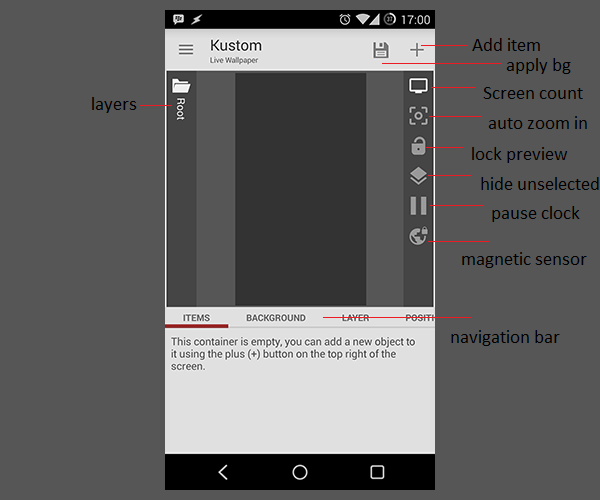
Kustoms comes with an easy to use interface. Most of the specific functions of the interface I'll cover in future parts of the Kustom Beginner's Guide, for now you can acquaint yourself with the layers menu on the left side. After adding new items to your preset you can navigate easily through the layer menu. On the right side you have the add new items button and some options to make designing presets easier. You can automatically zoom into smaller parts of you screen or pause clock animations. On the bottom you have the navigation bar with all options to adjust your items. The bar changes depending on your current item. 
 
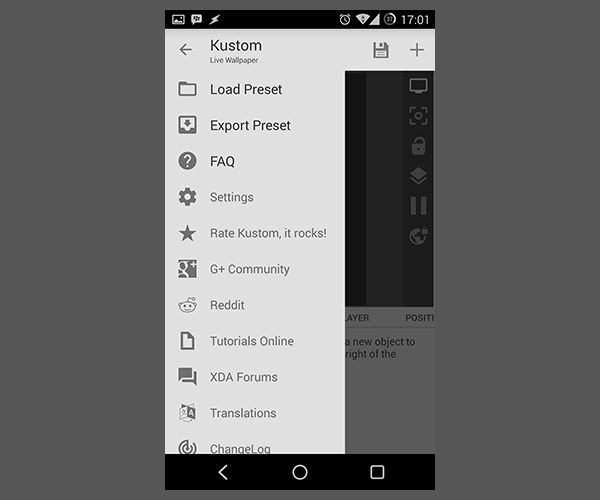
The hamburger menu on the left side contains load and export functions for your whole wallpaper, setting and some links. Make sure to check the FAQ and rate Kustom!
Kustom Side Menu Notes

Settings

One of the first things to do is to adjust the settings your way. I would advise you to change your app language to English since all the tutorials published on every site will be in English and it will be way easier to work with the Kustom Beginner's Guide that way. 

Load Preset

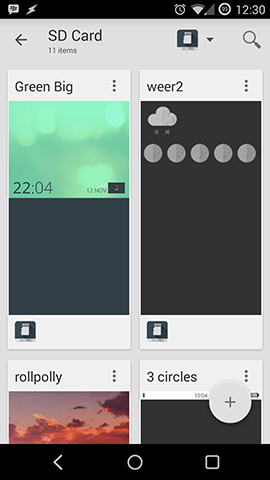
To load a preset open the menu and pick Load Preset. You will be presented with some preloaded presets and can pick one to open (my screenshot just shows the presets on my SD Card). To make a new preset or import one press the add button and you will see a menu.
Kustom load preset


Add items

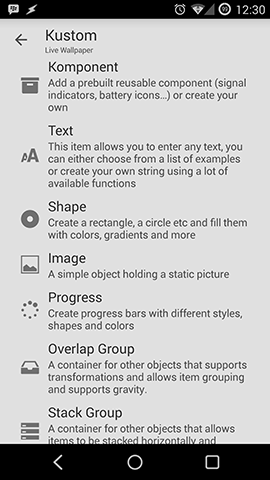
A preset or wall consists of items, to add one just press the "+" on the top right. I think text, shape, image and progress bars are self explaining.
Kustom add items

Komponent

Komponents are intended to make sharing parts of walls easier. You could think of it as a widget and it's possible to put all the other items into it. You don't have to start with a komponent, you can copy all your items into one after you are finished with the design, more to that in the clean design art of this Kustom Beginner's Guide.
Komponents are also the only way for weather iconsets inside Kustom. the difference to Zooper is that here you have to add a weather komponent and not the iconset directly.
The "Komponent" is a special Overlap Layer that can be exported and reused. The "Komponent" group is like a preset within a preset and allows you to create your own modules with their own global variables. So, for example, if you create a Clock you can then export the Komponent and add this clock to other presets by loading it in one shot, the globals of the Komponent will become the settings of it so when using the module you will not see the objects inside (unless you unlock it) but just the basic settings. Komponents can also be distributed via APK. Please check the tutorials section for more examples. (viakustom.uservoice.com)
There will be a special, more detailed post for komponents in the Kustom Beginner's Guide.

Overlap Group

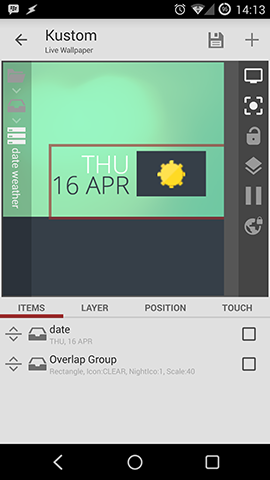
Overlap groups are the easiest way to arrange items over each other. Only now you can use drawing modes (not possible with items in the root layer).
The "Overlap" group is a container for other modules, the layer size will increase based on its contents so it will basically "wrap" the items inside it. As the name suggest the "Overlap" group will place the items one on top of the other, you will then need to use the padding or the anchor to move them inside, the anchor is relative to the Group so if you anchor something "top left" in an Overlap Group it will be the top left of the group itself. 
Benefits of using an Overlap Group are:
  • You can scale all items inside the group together by using the Layer -> Scale property
  • On a Wallpaper root you can "repeat" or "mirror" the layer using the "Tiling" option, this is very useful in order to create pattern based wallpapers
  • You can animate, move and re position all items together
  • Overlap Group provides "static center" rotation, so, if you enable rotation of a group the group will rotate based on the group center, so the overlap group is the basis to create clock hands (see the clock tutorial in the tutorials section)
There will be a more detailed post for overlay and stack groups in the Kustom Beginner's Guide.

Stack Group

This item comes in really handy. In other customization apps you always had to position items manually and rearrange them when sizes changed. With Stack Groups you can easily arrange items horizontally or vertically.
For example here you can see a stack group and an overlap group inside a stack group. The big stack group stacks two items (Day/Date stack  and Weather overlay) horizontally, the Day/Date stack group stacks to text items vertically together and the overlap group is a background and the weather komponent.
With this groups it's really easy to change sizes or move the thing altogether.
Kustom Stack Group
A stack group is a container that allows automatic "stacking" of the items, so if you want to have multiple text items placed one after the other horizontally or vertically you will use a Stack. This is especially good when you want to place one item just after another but the item size might change dynamically. The stack allows also to anchor items all to one side of the group, try playing with the stacking option in the "Layer" section. (viakustom.uservoice.com)
There will be a more detailed post for overlay and stack groups in the Kustom Beginner's Guide.

Globals

Global variables are there to make bulk changes to items easier. For example, it's quite easy to change the color of all items with one global variable.
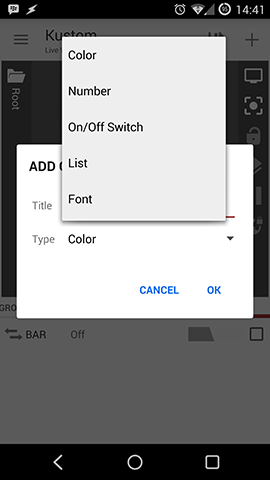
Globals can be: 
  • Color
  • Number
  • On/Off Switch
  • List
  • Font
Kustom globals
If you open the Advanced Editor you will notice on the first "root" container a tab called "globals", that section will allow you to add / remove and change Global variables which are just settings that can be applied to multiple modules at once. So, how to use them?
So let's say you have a preset with a lot of text items around and you decide that you want to change the font of all of these very quickly from a single setting point, so, in this case, you use a Global, so you:
  • Create a Global of type "Font" in the Globals section mentioned above
  • You go in the TextModule, select the "Font" preference and then click on the "Globe" icon in the actionbar on top
  • Then you click again on the option and select the Global you just created from the list
  • Repeat this for all the Text modules you want to change with that global
That's it! You can now change the font of all these modules just changing the Global preference in the main container.
There will be a more detailed post for globals in the Kustom Beginner's Guide.

Animations

One of the big advantages of Kustom are animations. With this you can create interactive design with almost no limits.
Kustom Matte
In Kustom all items placed in the "root" module can be animated, in order to do so please use the "animation" tab and add one or more animations. If more than one animation is added the animations will be combined, the order is not relevant. 
Animations have a lot of parameters, let's see what they do:
  • ReactOn this will control when the animation will be triggered, currently only "scroll" is supported which means that it will be activated by screen swiping
  • Action represents the type of animation to perform, scroll and scroll inverted will move the object horizontally, fade will change its transparency, scale will change the size and rotate will rotate the object
  • Center decides in which screen the item will be in its "starting" position so this is where the animation will start from, for example, if you have a centered item and center set to screen 1 the item will be centered on screen 1 and start moving from there
  • Speed controls how fast the "action" is performed, for example when fading at speed 100 in scroll the item will go from full opacity to fully transparent in one screen, if speed is 50 it will take 2 screens to fade out
  • Amount will decide when to stop, 100 means that the full animation will be applied (so, in case of fade it will go from full opacity to transparent), 50 means that only 50% will be applied, so when opacity will be 50% it will stop. This is available only on certain animations.
  • Rule controls when this animation is applied, so for example "before center" will tell the animator to use the animation only up to the center and ignore it after it. The default is "center" which means that animation will be applied before and after the center.
  • Anchor will set the anchor point for a rotation or a scaling
There will be more posts after this, this is just the basics, Videos tutorial and More screenshots will be provided in the next post, stay tuned.
Or watch this video on how awesome my home screen looks to keep your hopes up, below..


This app is so great that it made me change my mind on getting a new android device, am not gonna be surprised if I end up using this app fo...

How To Earn Up To $10 Daily On Your Android Device [GUIDE]


Appdango

Appdango is one of the best & great apps to earn free rewards using your android device.you can download apps from it to earn points & after points can be converted to paypal cash, amazon gift cards, free gifts & many more.this app is worth trying & you can payout 500 points to 1$ paypal.

How to earn ?

✴Download appdango app from Here

✴Use above link to receive 50 points as bonus or else you’ll not get anything as joining bonus.

✴Now sign up for it & start downloading apps
After you reached 500 points withdraw then to your paypal

✴That’s all !

Screenshots


Share this article with your Friends and love ones.

Appdango Appdango is one of the best & great apps to earn free rewards using your android device.you can download apps from it to earn p...

Get Up To #50k Airtime Recharge On Any Network With This Ultimate Promo Link


Discover Zoto – The Fastest way to recharge anywhere in Nigeria!
Recharge airtime 24x7, in a few seconds. Get cashback with every recharge & recharge for friends and family. Fast. Safe. Secure. New Users – Use Code ‘ZOTO50’ and get 50% Cashback (upto N100 – T&C Apply).

Also introducing ZOTO REFERRALS!
- Earn upto N50,000.
- Invite a friend to Zoto & earn N1000 on friend's first recharge.
- Invite upto 50 friends!

Zoto is Nigeria's leading mobile phone recharge app.

GET STARTED

- Fastest Recharge: Complete your online recharge transaction within seconds.
- Prepaid Mobile recharge for all major operators in Nigeria including Airtel, Etisalat, MTN and Glo
- 100% Secure. Your money is always in safe hands
- Get amazing discounts and cashbacks on every recharge
- View tariff plans of full talktime, top up, data usage for all major operators for prepaid mobile recharge
- Pay using debit card, credit card for all leading banks (Mastercard, Visa and Verve) as well as ZotoCash Wallet
- Save recharge, account details & transaction preferences for quick repeat experience
- Recharge for your friends & family members with just 1-click
- View your older recharges and payments to recharge faster
- ZotoCash for super quick mobile recharge experience. Your money is always in safe hands.
- View your earned ZotoCash and use them to recharge.

KEY FEATURES

- 100% Secure: Zoto is PCI-DSS certified and one of the few very secure recharge applications. All your transactions are 128 bit SSL secured with trust seal from industry leaders such as VeriSign
- Great customer support to handle any kind of unexpected issues. We promise to get back to you within 24 hours.
- The app is small size, fast and light on your mobile phone and network. Works very well on slow data connections as well.
- Invite friends & family on Facebook, Twitter, Email or Whatsapp to use the app and earn ZotoCash

How To Get Up To 50k

➡ Download Zoto From This Ultimate Secured Link Here
➡ Register And Fill in your complete details 
➡ Recharge Your phone via the app using your atm card, you can recharge as low as #100 ( This app is fully secured by Norton and other top security enterprise)
➡ After recharging you will be given #1000 plus your initial #100 recharge 
➡ Note : this is a promo, make use of it while it lasts


Share with your friends to enjoy this Eid season.

Discover Zoto – The Fastest way to recharge anywhere in Nigeria! Recharge airtime 24x7, in a few seconds. Get cashback with every recharge ...